
All rights reserved.
Quick menu mobile
Add quick menu at bottom in mobile.
And here you can find out more about theme updates, new features and about our upcoming themes:
- Follow us on Facebook
- Follow us on Twitter
- Follow us on Posthemes
PosThemes,
Frontend Appearance

Configure Quick menu mobile
- Login your Prestashop admin
-
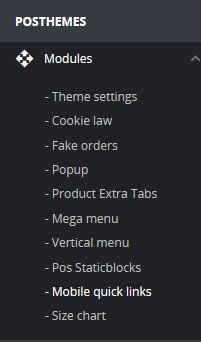
Go to POSTHEMES > Modules > Mobile quick links
-
We got :

***In Quickmenu Items :
Click Add New icon
 to add new quick menu item
Image : Click Modify icon to or upload file to change/upload icon.
Title : Enter title for this tem
Type : Select type for this item: Pretashop link, custom link, custom content,...
- Click Save to save this item
Click Edit to edit a quick menu item


Image : Click Modify icon to or upload file to change/upload icon.
Title : Enter title for this tem
Type : Select type for this item: Pretashop link, custom link, custom content,...
- Click Save to save this item
***In Customize Module Design :

Icon Color : Select color for icon
Show text : Choose Yes to show text
Text color : Select color of text
- Click Save button when you finish
Translate module
- Login your Prestashop admin
- Go to International > Translations

- At "Modify translations" section:
- Type of translation : Installed modules translations
- Select your module : Select Quick menu mobile
- Select your language : Choose language you want to translate
- Choose Modify
- Then Search titles
- After typing your language, click Save and stay or Save to finish.
Posthemes Support
Support Working time: Monday - Friday
Estimated ticket and answers review time: 1-3 business days.
We have hundreds of questions and provide answers asap, but this can take up to 3 days after your submitted request. Please be patient and wait for answer.
Send us email to posthemes@gmail.com.